How Do Student Discounts Work?
Many merchants offer student discounts as they want to capture the student user base early in life to create long-term loyalty.
Most of these student discounts require you to prove you're currently enrolled. There are a few ways companies verify this:
.edu email address The most common method. If your school gives you a .edu email (or equivalent), many services accept that as proof. Just sign up with your student email.
Verification services Many companies use third-party verification:
UNiDAYS — Popular in the UK, US, Australia
SheerID — Used by Apple, Spotify, and others
Student Beans — UK-focused but expanding globally
You create an account, upload proof of enrollment, and get verified. Then discounts unlock automatically.
Student ID upload Some services ask you to upload a photo of your student ID card. Less common, but some regional services use this method.
Manual verification A few companies manually review applications. Slower, but sometimes the only option for students at smaller institutions.
Who Qualifies for Student Discounts?
College student discounts and university student deals are widely available, most major services offer them.
Eligibility varies by company, but generally includes:
University and college students Full-time and part-time undergraduate and postgraduate students. This is the main group.
High school students Some discounts extend to secondary education, especially for tools like Notion and Canva.
Teachers and educators Many "student" programs also include teachers, professors, and school staff. Often called "education pricing" rather than "student pricing."
Recent graduates A few programs offer a grace period after graduation, usually 6-12 months. Not common, but worth checking.
Apprentices and vocational students Sometimes included, sometimes not. Depends on the program and your institution.
Quick Eligibility Check
Status | Usually Qualifies? |
University student (undergrad/postgrad) | ✓ Yes |
College student | ✓ Yes |
High school student | Sometimes |
Teacher / educator | Often (as "education" pricing) |
Recent graduate | Rarely (6-12 month grace period) |
Apprentice / vocational | Sometimes |
When in doubt, apply anyway. The worst they can say is no.
Best Student Discounts by Category
Here are some of the best student discounts available by category. These are some of the most popular, not an exhaustive list.
Keep in mind that these vary broadly by geography, student deals in the US aren’t the same as student deals in Australia.
Streaming and Entertainment
Service | Student Offer |
Spotify | 50% off Premium |
Apple Music | 50% off subscription |
YouTube Premium | 50% off ad-free + YouTube Music |
Amazon Prime Student | 50% off + 6-month free trial |
Tinder | 50% off Tinder Gold |
Playstation Store | Up to 75% off |
Productivity and Creative Tools
Tool | Student Offer |
Notion | Free Plus plan for students |
Microsoft 365 | Free for students at many institutions |
Adobe Creative Cloud | 60%+ off full suite |
Canva | Free Pro plan for students |
Figma | Free for students |
Grammarly | Education discount available |
Developer Tools
Tool | Student Offer |
GitHub | Free Pro + Student Developer Pack |
JetBrains (IntelliJ, PyCharm, etc.) | Free for students |
Autodesk (AutoCAD, etc.) | Free for students |
Figma Professional | Free Figma Pro |
Health and Wellbeing
Service | Student Offer |
Headspace | 85% off annual subscription |
Gymshark | 10% off via Student Beans |
ASOS | 10% off via UNiDAYS |
Strava | 50% off |
Note: Offers change frequently. Always verify current terms before purchasing.
Where to Find Student Discounts
Student deals aren't always obvious. Here's where to look:
Direct From the Company
Search "[company name] student discount" or look for an "Education" link in the footer. Many companies have dedicated student pages, they're just not directly linked.
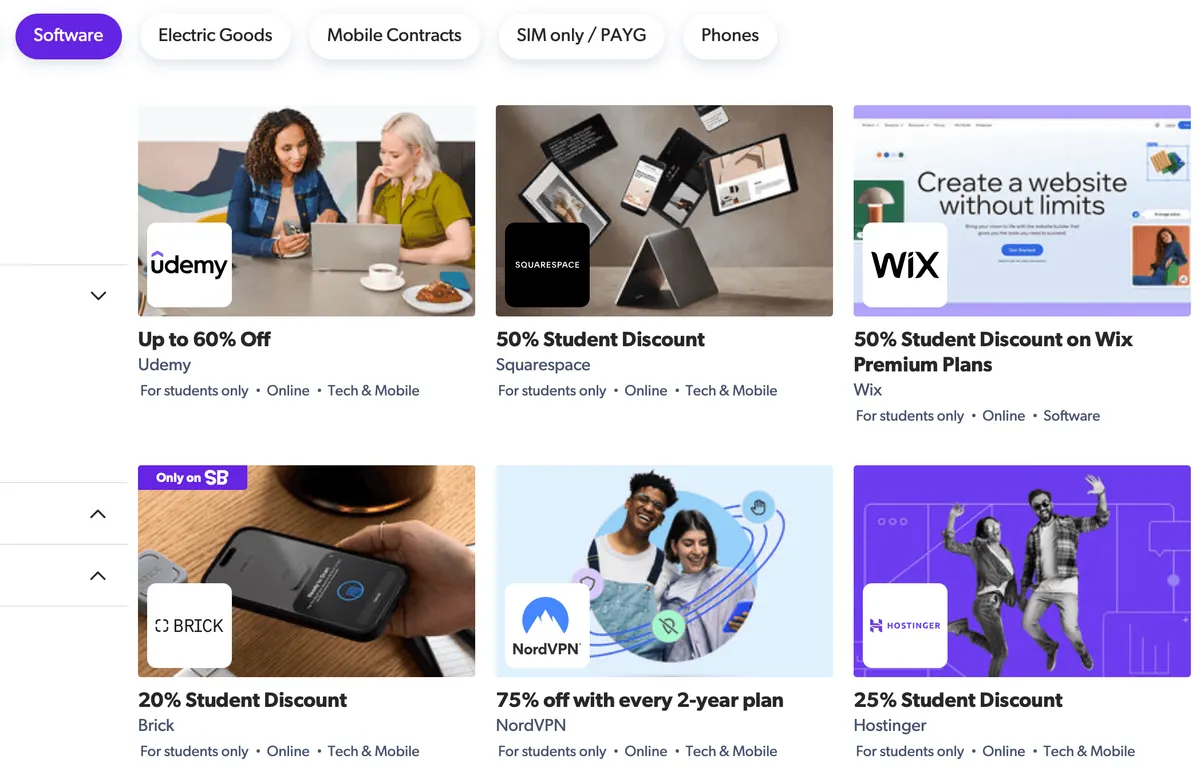
Verification Platforms
Create accounts on these, they aggregate discounts and make verification easy:
UNiDAYS — Wide range of brands, popular in UK/US/Australia
Student Beans — Strong in UK, expanding globally
SheerID — Used by major brands for verification
Once verified, discounts apply automatically or via codes.
Your University
Check your university's IT portal or student services page. Many institutions have:
Free Microsoft 365 or Google Workspace
Discounted or free software licenses
Deals negotiated specifically for students
You might already have access to things you don't know about.
GitHub Student Developer Pack
If you're a developer or studying anything technical, this is essential. The GitHub Student Developer Pack includes free access to dozens of tools:
GitHub Pro
JetBrains IDEs
DigitalOcean credits
Namecheap domains
And many more
Completely free while you're a student.
Our Deal Finder
We track hundreds of discounts and soon will include student offers. Add your subscriptions and we'll show you what deals you qualify for.
Tips for Maximising Student Discounts
Sign Up With Your Student Email
Use your .edu email (or university email) when creating accounts. Even if they don't advertise a student discount, some services automatically detect student emails and offer discounts.
Verify Once, Use Everywhere
Services like UNiDAYS and Student Beans let you verify once and then access discounts across multiple brands. Set up accounts on these early.
Go Annual Before You Graduate
If you're in your final year, lock in annual subscriptions at student rates before you lose eligibility. You'll keep the discount for that billing cycle even after graduation.
Check for Education Bundles
Some companies bundle multiple products at student rates:
Apple offers discounted bundles with free AirPods during back-to-school
Adobe's full Creative Cloud is much cheaper than individual apps
Microsoft 365 Family can sometimes be cheaper than individual student plans
Stack With Other Discounts
Student discounts sometimes stack with:
Seasonal sales (Black Friday)
Annual billing discounts
Referral credits
Not always, but worth trying.
Don't Forget Hardware
Student discounts aren't just for software. Apple, Dell, Lenovo, Samsung, they all have education pricing. If you're buying a laptop anyway, check for student deals first.
What Happens After Graduation?

Most student discounts end when you're no longer enrolled. Here's how to prepare:
Lock in annual plans before you graduate If you subscribe annually, you keep the rate until renewal, even if you've graduated by then.
Afterwards you can check if you are eligible for any cancellation discounts.
Check for alumni discounts Some services offer reduced (but not full student) pricing for recent grads. Rare, but worth checking.
Look for alternatives Once full price kicks in, evaluate if you still need the tool. There might be cheaper alternatives or free tiers that are good enough.
Switch to other discounts Not a student anymore but still want to access deals? Check out our comprehensive guide on saving money through subscription deals.
And if you’re looking to start a company after graduating you could be eligible for cheap or even free startup SAAS deals.
Frequently Asked Questions
How do I verify my student status?
Most services use your .edu email, or third-party verification through UNiDAYS, SheerID, or Student Beans. Some accept student ID uploads. The method depends on the company.
Do student discounts work for online courses or part-time students?
Often yes, as long as you're enrolled at an accredited institution. Part-time and online students usually qualify. Check specific program terms.
Can I keep my student discount after I graduate?
Generally no, most discounts require active enrolment. But if you're on an annual plan, you'll keep the rate until your next renewal date.
Do teachers qualify for student discounts?
Many "student" programs include teachers and educators under "education pricing." Apple, Adobe, Microsoft, they all offer educator discounts.
What if my school doesn't give .edu emails?
Use verification services like UNiDAYS or SheerID. You can upload proof of enrolment (acceptance letter, student ID, enrolment confirmation) to verify manually.
Can I use student discounts for my side project or freelance work?
Usually yes, the discount is tied to your student status, not what you use the tool for. But check terms of service if you're unsure.
Are these discounts available worldwide?
Many are, but some are region-specific. Spotify Student, for example, isn't available in every country. Check availability for your location.
Quick Wins: Claim Your Student Discounts Today
Check what you're already paying for — Are you paying full price for something with a student discount?
Set up UNiDAYS and Student Beans accounts — Verify once, access discounts everywhere
Check your university's software portal — You might have free access to tools you didn't know about
Get the GitHub Student Developer Pack — Free tools worth hundreds if you're into dev
Go annual on tools you love — Lock in student rates before you graduate
[Browse discounts in our Deal Finder →]
Part of our guide to saving money on subscriptions and SaaS →
Use Orbit to track smarter, save more, and make your money work for you.