
How to Cancel Subscriptions on an iPhone
If the subscription was through the App Store or an in-app purchase, here's how to cancel it:
Step 1: Open Settings on your iPhone
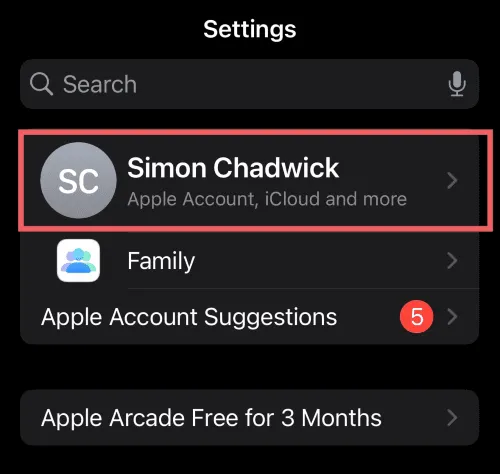
Step 2: Tap your name at the top
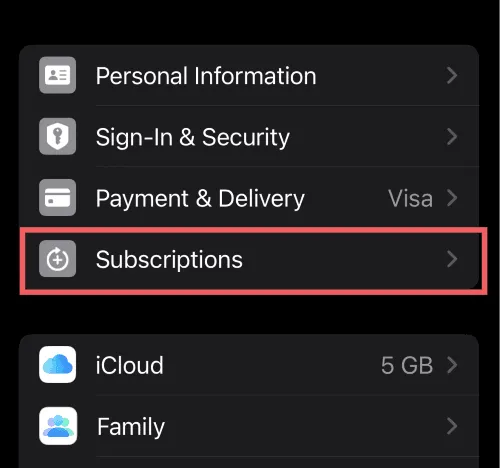
Step 3: Tap Subscriptions
Step 4: You'll see all your active and expired subscriptions
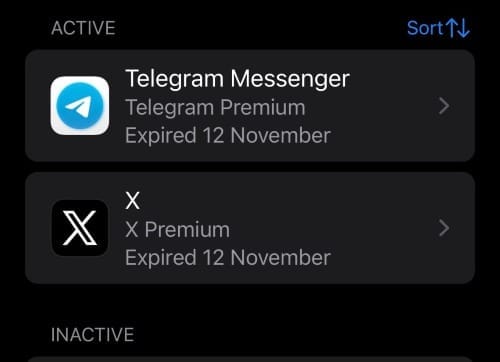
Step 5: Tap the one you want to cancel
Step 6: Hit Cancel Subscription
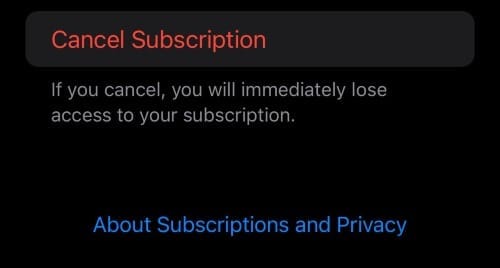
Step 7: Confirm it
And you're done. You'll still have access until the end of your current billing period — it just won't renew.
Easy. Now you can go through and do the same for any other Apple subscriptions you want to get rid of.
What About iPad or Mac?
Same deal, slightly different path:
iPad: Settings → [Your Name] → Subscriptions → Tap the sub → Cancel
Mac: App Store → Click your name (bottom left) → Account Settings → Subscriptions → Manage
You can also do it from any browser at apps.apple.com/account/subscriptions.
What If It's Not Through Apple?
Here's where people get tripped up.
Not every subscription goes through the App Store. If you signed up directly on a website, like Netflix.com or Spotify.com, you won't see it in your iPhone settings. Apple only shows what Apple bills.
If you can't find a subscription:
Check your bank statement to see who actually charged you
Cancel directly with that company
If it's through Google Play or your phone carrier, you'll need to cancel there instead, check our guide to cancelling bundled subscriptions
Not sure how to cancel a specific service? We've got step-by-step guides for 320+ subscriptions that can help.
Avoiding the Free Trial Trap
I use the same system to avoid unexpected free trial charges.
Here's the trick: when you sign up for a free trial on your iPhone, cancel it immediately. Most of the time you'll still have access until the trial ends, you just won't get charged when it's over.
How I do it:
Sign up for the free trial
Go straight to Settings → [Your Name] → Subscriptions
Tap the new subscription
Cancel it
Enjoy the trial without worrying
It's a simple habit that's saved me from plenty of "wait, I got charged for THAT?" moments.
Some apps might cut off access early, but most don't. And if you decide you actually want to keep it, you can always resubscribe.
Here's a deeper article on how to cancel free trials before getting charged.
How to See What You're Actually Paying For
If you've lost track of what you're subscribed to (no judgement, we all have), here's how to check:
On iPhone: Settings → [Your Name] → Subscriptions
That'll show everything billed through Apple.
For everything else: Check your bank or credit card statements for recurring charges. Those mystery $9.99 charges? Probably a subscription you forgot about.
Want a quicker way to find forgotten subs? Try our subscription audit quiz, it takes 2 minutes and usually surfaces a few surprises.
Common Questions
Can I get a refund after cancelling?
Apple won't automatically refund you, but you can request one at reportaproblem.apple.com. Worth a shot if you were charged unexpectedly.
Will I lose access straight away?
Nope. You keep access until the end of your billing period.
Why can't I find the cancel button?
Either the subscription already expired, or it wasn't through Apple. Check who billed you and cancel with them directly.
Can I do this from my computer?
Yep. Head to apps.apple.com/account/subscriptions and sign in.
Related Guides
Looking for something specific? Browse all cancellation guides →
Tired of Subscription Clutter and Chaos?
We are too. That's why we're building Orbit, an app to help you gain visibility and control over your subscriptions.
Discover hidden subs. Set alerts before you get charged. Cancel easily. And soon, dedicated virtual cards for even more control.
Beta starts soon and we're looking for early adopters to help test and refine the product.
It takes a couple of minutes to see everything you’re paying for.
Part of our guide to managing your subscriptions.